
All features
Everything in Kıvılcım, what it's for and which device it works on. All free; no account or internet needed.
- Everywhere
- Android, web and desktop
- On phone
- In the phone app; Android for now
- Android
- Android only
- Web
- In the web version in your browser
- Coming with iPhone
- iPhone version coming soon
Today
A repeat that fits you
Tasks repeat every day, a few times a week or on set days. You can also add a habit you want to quit; then your clean days are counted.
EverywhereStart small, grow it
Counters, timers, sub-steps, a mini version and a goal that rises week by week; on a hard day a small step still counts.
EverywhereOne tap or a swipe
Complete a task with one tap or by swiping right, skip it with a joker by swiping left; the list is done in seconds.
EverywhereThe Today orbit
Kıvı stays in the middle and today's tasks slowly circle and float around it as bubbles. Tapping completes a task and holding opens its options; the ring around Kıvı shows the day's progress and closes completely when every task is done. If the tasks don't fit, the last bubble becomes “+N” and opens the list.
EverywhereThe Up next card
Only one card sits below the home screen at a time: a newly unlocked section, the reminder question, a ready chest, a letter, closing the day in the evening. The home screen never gets crowded.
EverywhereToday's steps
The home screen header shows “You took 4,213 steps today”. Permission is asked once, after you tick your first task; if you decline, or the phone has no step counter, the line never appears.
Coming with iPhoneReminders on time
Per task, a heads-up 15 minutes before and “did you do it?” 60 minutes after. Notifications can be normal, gentle or one daily summary; reminders never smother you.
On phoneLocation reminders
Lets you know when you arrive at a place you chose; walk into the gym and your workout task comes to mind.
On phone, in the background tooWeb: while the app is openExport to calendar
Export your tasks to the calendar app you use; the day's plan lives in one place.
EverywhereCheck off with QR and NFC tags
Print a QR tag and stick it on your fridge; scan it and the task is checked off. The same link can be written to an NFC tag too.
With the phone appWith the web versionNFC writing: Android Chrome, betaIf–then
A trigger like “after my coffee” ties a new habit to something you already do; remembering gets easier.
EverywhereA simpler list on bad days
On a hard day the easiest tasks come first and the rest fold away. For newcomers, sections unlock day by day; not everything arrives on day one.
Everywhere
Streak
5 flame tiers
As your streak grows, your flame changes color: a new tier on days 7, 30, 100 and 365. The color tells you how far a long streak has come.
EverywhereProtect your streak
Freezes (up to 3), a streak shield, vacation mode and streak recovery; one missed day doesn't erase months of streak.
EverywhereGraduate a habit, start a new season
You graduate a habit that has stuck. In a new season the counters reset; your history stays.
EverywhereCelebrations and day close
A celebration when you reach a new tier and on every new streak day; in the evening, a summary that wraps up the day.
EverywhereLanguage without blame
It doesn't scold you when a streak breaks; it shows how consistent you've been: “27 of the last 30 days, 90%”. You pick the coach's tone: Kind friend, Tough coach or Playful.
Everywhere
- Orange FlameStarts on day one.
- Gold FlameOn day 7.
- Blue PlasmaOn day 30.
- Purple NovaOn day 100.
- White StarOn day 365.
Game
Sparks and bonuses
10 sparks per task. Bonuses for a perfect day, early bird (05:00–09:00), star of the day (×3) and hard tasks; your effort becomes visible.
EverywhereRewards and shop
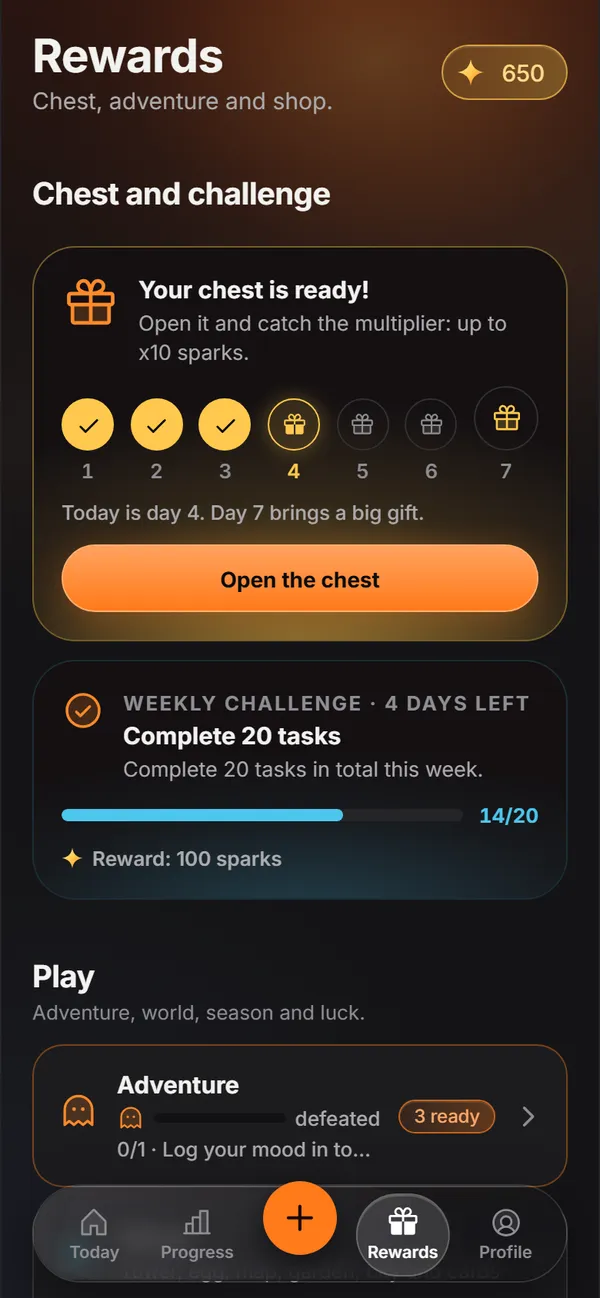
The Rewards tab holds the chest, the weekly challenge, adventure, world, season and luck; the shop sits below: task joker, power potion and streak shield. Everything is bought with sparks; nothing is bought with money.
EverywhereCosmetics
4 cosmetic themes (Synthwave, Glacier, Forest, Lava); confetti, flames and backgrounds; row, button and quote skins; avatars and costumes, name effects and frames. There's a deal of the day and item merging too.
EverywhereCheck-in sound: web and desktopLuck corner
A lucky wheel, a mystery box and a spark piggy bank that pays interest; the sparks you save grow too.
EverywhereChest strip and multiplier
A chest every day on the 7-day chest strip; stop the marker at x1, x2, x4 or x10. Golden check-ins, spark showers and happy hour arrive as surprises too.
EverywhereAdventure
A baby dragon, a weekly boss and the season path. One skill tree unlocks 6 powers across 3 tiers; the weekly challenge and real-life rewards you set yourself live here too.
EverywhereWorld
A tower, an egg, a map, a habit garden, a city and habit cards; a small world that grows as you do your tasks.
EverywhereBadges and titles
33 badges (4 hidden), 9 level titles from Spark to Supernova and titles you unlock with badges. At the end of the year, “Kıvılcım Wrapped” tells the story of your year.
Everywhere
Know yourself
Charts, calendar and records
Weekly chart, 12-month heatmap, calendar, forecast and records; see where you are and where you're heading at a glance.
EverywhereMonthly report card and habit strength
Shows month by month how well each habit has stuck.
EverywherePatterns and hard-day forecast
Finds your best hours and tells you in advance which day might be hard; you plan around it.
EverywhereSpark economy
A screen that shows where your sparks come from and where they go.
EverywhereAutomaticity meter
Measures with a few short questions how automatic a habit has become; you see whether it has stuck or still takes effort.
Everywhere
Rituals
Journal
Mood, intention, gratitude and a question-free “write quietly” page. Voice journaling depends on browser support: Chrome and Safari have it, Firefox doesn't.
EverywhereVoice journal: depends on the browserJust for you
A letter to your future self, a quote book, a dream board and a birthday surprise; you won't forget why you started.
EverywhereBreathing and Pomodoro
Breathing, focus rounds and countdowns; tap a breathing, journal or timed task and its tool opens, then the task checks off when you finish.
EverywhereSeasonal packs and starter quiz
5 seasonal packs: New Year Resolutions, Winter Energy, Exam Season, Summer Shape and Back to School. The starter quiz suggests a start that fits you in five short questions.
Everywhere
9 guided programs
- Hydration in 10 days10 days
- A calm mind in 14 days14 days
- Wake up early in 21 days21 days
- Deep focus in 21 days21 days
- Get moving in 4 weeks28 days
- Deep sleep in 28 days28 days
- A reading habit in 30 days30 days
- Good posture in 30 days30 days
- A lasting habit in 66 days66 days
Share
Cards
Streak card, weekly summary, report card story and achievement certificate; share your effort as an image.
EverywhereTogether
Friend duels by QR, pack sharing and joint challenges; with a code, no account needed.
EverywhereSend a cheer
Support without scores: no race, no comparing, just courage.
Everywhere
Family, backup and security
Family profiles and kid mode
Every family member gets their own profile. In kid mode the shop, sharing and outside links are off; leaving it takes the parent gate.
EverywhereLock
PIN lock everywhere. Fingerprint works on Android too; Face ID comes with the iPhone version.
PIN: everywhereFingerprint: AndroidFace ID: coming with iPhoneBack up and restore
File, clipboard or CSV. A local backup is made automatically every day; on phone it can also be written to a cloud folder automatically.
EverywhereCloud folder: on phonePrivacy center
Shows what is stored and why each permission is asked for; you can delete everything in one place.
EverywhereFeedback
Report a bug or send an idea from inside the app. Your task names and journal aren't added to the message.
Everywhere
Appearance and accessibility
6 theme options
Automatic (follows your device), Night, AMOLED, Day, Aurora and Sakura; whichever is easiest on your eyes.
EverywhereComfortable use
Calm motion, color-blind friendly markers, one-handed use, a sky that follows the time and night softening.
EverywhereText size and haptics
3 text sizes on web and desktop; on phone the app follows your system text size. 4 haptic levels on phone.
Text size: web and desktopHaptics: on phoneOrganizing
Bulk edit and a task archive; tidying up gets easier when your list grows.
EverywhereLanguage
English and Turkish; it follows your phone's language on first launch.
EverywhereiOS settings support
Support for iOS Reduce Transparency and Increase Contrast comes with the iPhone version.
Coming with iPhone
On every device
Widget and lock screen counter
The home screen widget shows your streak, progress and pending tasks; the lock screen counter is in beta.
AndroidQuick actions
Add the web version to your home screen and reach quick actions from its icon.
Web: when added to the home screenVoice assistant shortcuts
There's a step-by-step setup guide in the app; the shortcut opens the app on a phone and the web version on a computer.
With the phone appWith the web versionAdd to home screen
The web version needs no install; add it to your home screen from the browser.
WebStep counter tasks
Step tasks check themselves off; in beta, works while the app is open.
Android, betaSidebar and shortcuts
A sidebar layout and keyboard shortcuts on wide screens: Ctrl/⌘ + N new task, Ctrl + 1–4 sections, Ctrl + , settings, Esc back.
WebDesktopiPhone
The iPhone version is coming soon via the App Store and TestFlight. Face ID, Siri and iOS settings support come with it; until then the web version works in Safari.
Coming with iPhone